All About PE Files!
Quick Search
- PE File Format
- DOS & NT Headers
- Miscellaneous Files
- Data Directories
- Sections
- Terminology
- DLL
- PE File Analysis
PE File Format
- Executable/complied code file format used by Windows
- There are use cases involving other operating systems, but primarily associated with Windows
- Typical extensions
- EXE, DLL - Executable and Dynamic-Link Library
- OCX – ActiveX Control
- CPL – Control Panel controls
- MUI – Multilingual user interface
- DRV – device driver
- Consists of headers and sections
DOS & NT Headers
- Start of the DOS Header, first two bytes are the signature -> Always MZ
- 4D 5A – Always a PE
- Start of the NT Header, first two bytes are always signature -> Always PE

DOS Header & Stub
- DOS Header is a 64-byte long structure that exists at the start of a PE. This is not important on modern Windows systems, but makes it backwards compatible with MS-DOS
- DOS Stub contains the messages "This program cannot be run in DOS Mode" if opened in MS-DOS without the header
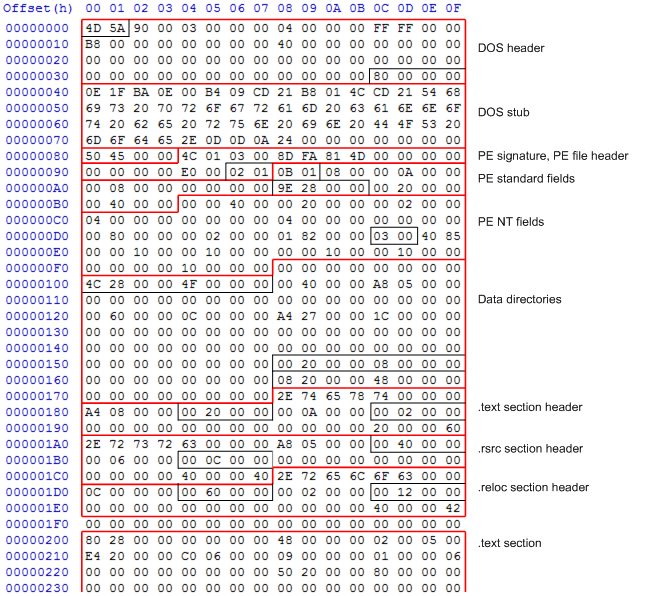
DOS Header & Stub Format
- Header – Header of section
- Stub – Code to execute when program is run
- NT Header info
- Flags specify the 32/64 bit, EXE/DLL, and other options
- Some threat actors strip the compilation data
- Characteristics -> Tell you if it is 32 bit or 64 bit, tell you if executable or DLL,
- Optional Header
- Mandatory actually -> only has this name since some file types do not contain it.
- Necessary for PE image files
- Magic Number -> How the OS will identify the executable and bitness - PE32 -> Portable executable for 32 bit - 0x10b - PE32+ -> Portable executable for 64 bit - 0x20b
- AddressofEntryPoint – When the program wants to start executing, it should start from where the address is stated
- In the .text section
- Not the first thing executed
- ImageBase -> Called an image when loaded into memory
- Tells the OS when its loaded into memory it needs to be put in the defined location (ex. Location 1000000)
- OS might need to negotiate the location its loaded into if something is already allocated
- Mandatory actually -> only has this name since some file types do not contain it.
- DLLs can be downloaded independently
Tools to look at PE file structure
Data Directories
- Export Directory
- Relative virtual address and size
- Import Directory
- Relative virtual address
- Libraries being used by executable are in this directory
Sections
- Sections are defined in the section table
- Offset, size, and flag values are typically stored
- Both real (in file) and virtual (in memory) offsets and sizes are provided
- Packing is a form of compression, the sample on disk is compressed but it wont show up like that in memory
Terminology
- VA – Virtual address
- In-memory location
- ImageBased – Virtual address where exe/dll will be loaded in memory
- Offset – Actual offset in file
- RVA – Relative virtual address = VA – ImageBase
- Distance from the ImageBase
- If VA =46000, ImageBase = 40000 then RVA = 6000
DLL
- Dynamically Linked Library
- Shared code can be statically or dynamically linked to an EXE
- Statically linked code is added to an EXE
- Dynamically linked code is kept within DLL files
- DLLs help promote modularization of code, code reuse, efficient memory usage, and reduced disk space
- DLLs vs EXEs
- DLLs export functions (and import from other DLLs)
- EXEs import or use functions
Common Windows DLLs (Usermode)
These are present on every machine
PE File Analysis
Static Analysis
- Analysis without executing the code
- Calculate the hashes to compare
- Examine PE structure
- Compile/Link timestamps
- Compiler/Linker type
- DLL Exports/imports and functions
- Section names and flags
- Resources
- String search
- Entropy
Raw String Search
- Strings are objects that represent sequences of characters
- Formats – ASCII (1 byte), Unicode (2 byte)
- Sysinternals strings tool
- Retrieves all ASCII and Unicode strings by default
Packed EXE Files
- Packing is the process of encrypting, obfuscating, and/or compressing content in a PE file
- Usually to thwart static analysis
- This all happens in memory
What about imports?
- Original imports are also gone
- DLLs and functions
- However, a packed program always imports these functions
- LoadLibraryA – Loads the specified DLL into memory
- GetProcAddress – Retrieves the address for specific exported function from DLL
- GetModuleHandleA – Gets a handle to loaded DLL
- A packed program uses its own code to dynamically link DLLs instead of using the Windows Loader
Detecting a packed EXE
- Look for unusual section names and characteristics flags
- Deleting section names does absolutely nothing
- Sections without names are weird
- Resources section having an executable can be odd
- Exception -> Installers might have the executables in the resource sections and that's where theyre unloaded from
- All sections being readable, writeable, and executable are weird
- Small sections without names are strange
Entropy
- Measurement of data randomness
- Calculated using the Shannon theorem
- Expressed as a number between 0-8
- 0 = Least random
- 8 = Most random
- Packed/Compressed data is more random than normal data
- Not a perfect indicator of packing
- Entropy calculation can be performed with tools like Entropy
DiE
- Detect it Easy
- File type identification tool
Cryptographic Algorithms
- Many malware use encryption to write to disk/network
- Standard encryption/compression/hash functions, routines, and constants can be identified using static analysis
- DES
- AES
- CRC32
- Blowfish