Browser Analysis - Safari
Overview
-
Default browser built into OS X
-
Integrated syncing across OS X and Ios DEVICES
-
Newer Safari versions store history in a sqlite3 database
-
-
Timestamps are stored in seconds since 00:00:00 Jan 1, 2001 UTC
Safari History plist
-
Older version of Safari hold browser history as a binary in a plist
- /Users/$user/Library/Safari/History.plist
-
WebHistoryDomains.v* key
-
Dictionary of domains that have been visited
-
Number of times a domain has been visited
-
-
WebHistoryDates key
-
URLs visited
-
Last visited dates
-
Redirect URLs
-
Page Title
-
-
plist only has a single timestamp called ‘lastVisitedDate’
- Written over each time a user revisits a URL
-
Recommended to use the Safari History.db file over the plist
- Sometimes both files exist if a user upgraded to a newer Safari version and never cleared their history
Safari History Database
-
More verbose timeline than the plist file
- /Users/$user/Library/Safari/History.db
-
Contains the following tables
-
History_items
-
History_tombstones
-
History_visits
-
Metdata
-
-
Timelines can be built from history_visits and history_items
-
History_visits
-
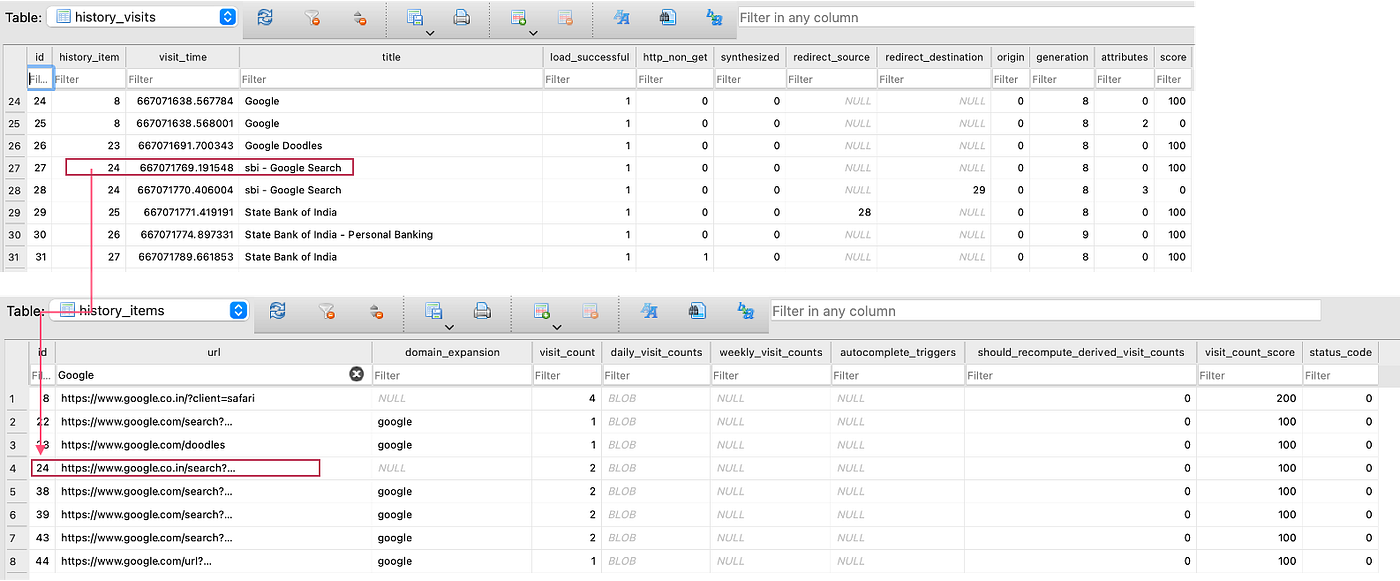
Holds an entry for each time a URL was visited with a unique identifier for the URL
-
To get it in plaintext, you need to perform a lookup on the history_items table
-
-
-
Example query to display the timestamp and URL
- SELECT h.visit_time, i.url FROM history_visits h INNER JOIN history_items i ON h.history_items = i.id
Safari Downloads
-
Safari stores a property list file for all files downloaded
- /Users/$user/Library/Safari/Downloads.plist
-
Convert the plist using plutil, plistbuddy, or defaults
- plutil -p /Users/$user/Library/Safari/Downloads.plist
-
Most important key/value pairs
- DownloadEntryURL, DownloadEntryPath, and DownloadEntryDateAddedKey
-
Older versions will not have DownloadEntryDateAddedKey
Other Safari Files of Interest
-
Bookmarks and iCloud account synced bookmarks
- /User/$user/Library/Safari/Bookmarks.plist
-
Most visited sites
- /Users/$users/Library/Safari/TopSites.plist
-
Allowed push notifications and timestamp for when they were granted permission
- /Users/$user/Library/Safari/UserNotificationPermissions.plist
-
Information about the latest exited Safari session
- /Users/$user/Library/Safari/LastSession.plist